
Updated Bump Test and Calibration Certificates
Learn more about our enhanced bump test and calibration certificates, providing you with better visibility and more actionable data in a modern, user-friendly format.
We're excited to announce that we are enhancing our bump test and calibration certificates! The enhanced certificates provide better visibility and more actionable data in a modern, user-friendly format to assist you in maintaining safety and operational excellence.
Viewing the Bump Test and Calibration Certificates
To view the bump test and calibration certificates, navigate to one of the following pages based on your Blackline Live domain:
North America (NA) and Rest of World (ROW): https://live.blacklinesafety.com/certs/
-
Europe (EUR): https://eu.live.blacklinesafety.com/certs/
Extended Certificate Availability
To give you more time to review, download, and archive certificates for record-keeping and compliance, bump test and calibration certificates are now available for 200 days from the date of the bump test or calibration.
Refreshed Layout And Expanded Certificate Data
The formatting and visual layout of live certificates and downloadable PDF versions have been updated. Test results are highlighted and display at the top of the certificate to provide a more intuitive presentation of your key data.
Several new data fields are added to provide a more comprehensive view of each test, offer deeper insights into device performance and testing conditions, and support better diagnostics and operational planning.
The new data fields include:
Device Information
Sensor and Dock Configuration Settings at the time of the test
Test Completion Date
Certificate Expiry Date
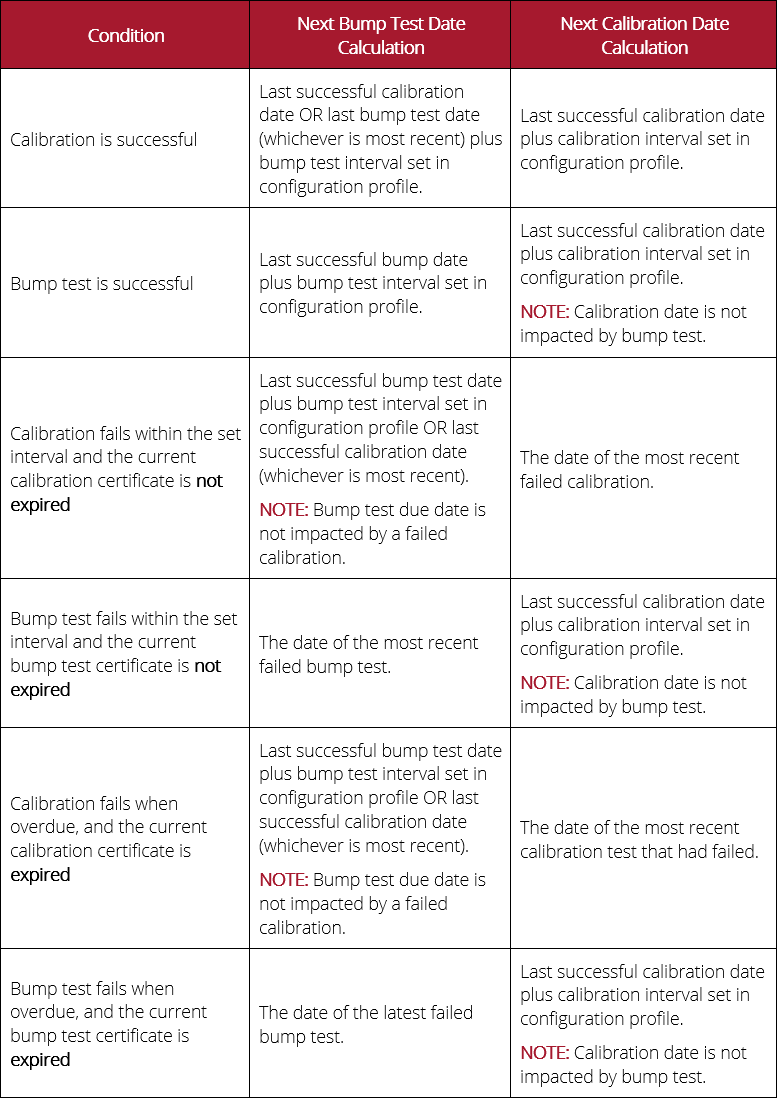
Next Bump Test and Calibration Date Calculations
The calculations used to determine the next bump test due and next calibration due have also been updated.
Multi-language Support
To ensure that users across multiple regions can access and understand their certificate data, certificates are now available in the following languages:
English (EN)
French (FR)
German (DE)
Dutch (NE)
Spanish (ES)
Portuguese – Brazil (PO-BR)
Portuguese – Europe (PO)
Italian (IT)
Russian (RU)
You can use the Language dropdown at the top of the certificate to select your desired language.
Technical Support
Contact details for the Blackline Safety Technical Support team.
Need help? Our Technical Support team is available 24/7 to assist you.
North America
Toll Free: 1-877-869-7212 | mailto:support@blacklinesafety.com
United Kingdom
+44 1787222684 | mailto:eusupport@blacklinesafety.com
International
+1-403-451-0327 | mailto:support@blacklinesafety.com
