
High-urgency Notification Types
High-urgency notifications are:
-
Fall detected
-
No-motion detected
-
Missed check-in
-
High gas
-
Over limit (OL)
-
Short term exposure limit (STEL)
-
SOS alert
-
Time weighted average (TWA)
Fall detected
The fall detected notification sensitivity is configurable by your Blackline Live administrator.
If your device detects a potential fall and you have not responded to the low-urgency potential fall detected notification, your device activates a high-urgency fall detected notification.
If AlertLink is enabled, G7c and EXO devices within the configured proximity radius of your device at the time of the triggering event receive a low-urgency notification and a message with the alert details.
EXO may be excluded from receiving AlertLink messages.
No-motion detected
The no-motion detected interval and sensitivity are configurable by your Blackline Live administrator.
If you are not moving and you have not responded to the low-urgency potential no-motion detected notification, your device activates a high-urgency no-motion detected notification.
If AlertLink is enabled, G7c and EXO devices within the configured proximity radius of your device at the time of the triggering event receive a low-urgency notification and a message with the alert details.
EXO may be excluded from receiving AlertLink messages.
Missed check-in
Check-in requests are configurable by your Blackline Live administrator. Both the check-in timer and pending notification time can be configured.
If you do not check-in during the low-urgency check-in notification, your device activates a high-urgency missed check-in notification.
High gas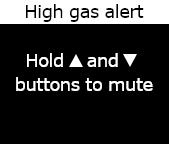
The high-gas notification is activated when G7 detects gas levels above the high-gas concentration threshold configured by your Blackline Live administrator.
A device equipped with an O2 sensor activates high-gas notifications in both oxygen-deficient and oxygen‑enriched environments.
When you acknowledge the high-gas notification, your device's banner and lights reflect the high-gas status until the gas conditions return to normal and the high-gas event is resolved.
If muted high-gas event conditions persist past 60 seconds, the high-gas notification re-triggers with lights, sounds, and vibration until the high-gas event is resolved.
G7 is equipped with a high-gas countdown timer that is configurable (enabled/disabled) by your Blackline Live administrator. Enabling the countdown timer can help reduce the frequency of false high-gas event notifications. If enabled, the countdown timer delays connecting to Blackline Live for 30 seconds.
If AlertLink is enabled, G7c and EXO devices within the configured proximity radius of your device at the time of the triggering event receive a low-urgency notification and a message with the alert details.
EXO may be excluded from receiving AlertLink messages.
Following the high-gas notification, the logged peak value of the high-gas event displays on the Gas options screen. The device shows the peak value recorded until a new peak is reached, or the peak value is reset during a power cycle of the device.
Short-term exposure limit (STEL)
The sensor short term exposure limit (STEL) notification is activated when G7 detects you have reached the STEL configured by your Blackline Live administrator.
STEL refers to the gas concentration that you can be continuously exposed to for a configurable time frame (default: 15 minutes) without suffering adverse health effects. STEL represents the rolling average of a live gas reading over the duration of a configured time interval.
When you acknowledge the notification, your device's banner and lights reflect the STEL status until the gas conditions dissipate and the STEL event is resolved.
Following the STEL gas notification, the logged STEL value of the STEL event displays on the Gas options screen. The device shows the STEL value until your device is power cycled.
Your Blackline Live administrator can configure your device to have G7 resume readings instead.
Time weighted average (TWA)
The time weighted average (TWA) notification is activated when G7 detects that you have exceeded the average allowable amount of gas exposure during a configurable interval (default: 8 hours).
The TWA interval used to calculate your allowable gas exposure is configurable and depends on the measuring method configured for your device by your Blackline Live administrator:
OSHA: Calculates TWA as a rolling average of gas exposure accumulated over an eight-hour period of operation. If the worker is in the field longer, the most recent eight-hour cumulative value is used.
ACGIH/EH40: Calculates TWA as the total accumulate average, from four to 16 hours as configured by your administrator.
ACGIH/EH40: Calculates TWA as the total accumulate average, from four to 16 hours as configured by your administrator.
When you acknowledge the notification, your device's banner and lights reflect the TWA status until the gas conditions dissipate and the TWA event is resolved.
Following the TWA notification, the logged peak value of the TWA event is displayed on the Gas options screen. The device shows the peak value recorded until a new peak is reached, or the peak value is reset when the device is power cycled.
Your Blackline Live administrator can configure your device to have G7 resume readings instead.
Over limit (OL)
The sensor over limit (OL) notification is activated when your device detects that the gas reading has exceeded the range of its sensor.
When you acknowledge the OL notification, your device's banner and lights reflects the high-gas status until the gas conditions dissipate and the OL event is resolved.
If AlertLink is enabled, G7c and EXO devices within the configured proximity radius of your device at the time of the triggering event receive a low-urgency notification and a message with the alert details.
EXO may be excluded from receiving AlertLink messages.
Following the OL notification, the logged peak value of the OL event is displayed on the Gas options screen. The device shows the peak value recorded until a new peak is reached, or the peak value is reset when the device is power cycled.
Your Blackline Live administrator can configure your device to have G7 resume readings instead.
SOS alert
If you require assistance, you can pull the red latch to manually send an SOS to monitoring personnel and request immediate help to your location.
When you acknowledge the notification, your device's banner and lights reflect the SOS status until the SOS event is resolved.
The SOS alert notification is configurable by your Blackline Live administrator. Your device can be configured to send a silent SOS alert notification that does not activate your device's light, sound, and vibration indicators.
If AlertLink is enabled, G7c and EXO devices within the configured proximity radius of your device at the time of the triggering event receive a low-urgency notification and a message with the alert details.
EXO may be excluded from receiving AlertLink messages.