
Browser Notifications for Blackline Live Alerts
On November 7, 2024, we are updating Blackline Live to include browser notifications for alerts. We recommend that all Blackline Live users enable browser notifications for Blackline Live alerts.
Browser notifications are pop-ups pushed to you from your Internet browser. For example, upcoming calendar events or new emails.
Enabling browser notifications ensures you will stay on top of alert management and are aware of urgent, time-sensitive incidents occurring among your device fleet. Browser notifications provide a visual indication of an alert, even if you are in a different tab or using a different application with Blackline Live in the background.
Enabling browser notifications
When we release browser-supported Blackline Live Notifications, your browser will prompt you to Turn on notifications on the Alerts page. Allowing notifications is not a permanent decision; you can always choose to change the setting later from your browser settings.
If you choose to block notifications for Blackline Live, the browser will not ask whether you want to see notifications again. To enable notifications after the initial prompt, you will need to manually update your browser settings.
The process for enabling or disabling these notification settings differ depending on which browser and version you are using. The following sections describe how to access notification settings for Google Chrome, Microsoft Edge, Mozilla Firefox and Safari at the time of this article’s release.
To enable Blackline Live browser notifications using a Chrome browser
- Select Allow to let the browser show notifications from Blackline Live.
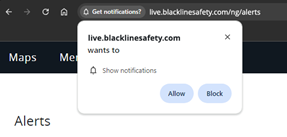
If you dismiss the pop-up or select Block, you can change the settings by selecting the settings icon to the left of the address bar.
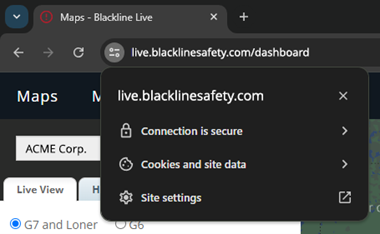
To enable Blackline Live browser notifications if you previously blocked or dismissed the prompt
- Select Site settings.
To enable Blackline Live browser notifications using a Firefox browser
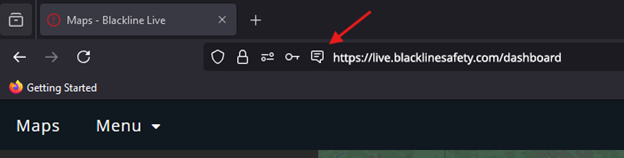
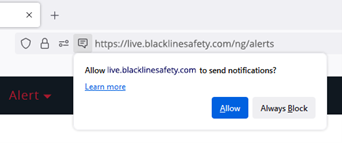
- Select the speech bubble icon to the left of the address bar. A prompt will open, asking if you want to allow Blackline Live to send notifications.
- Select Allow to enable browser notifications for Blackline Live.
To enable Blackline Live browser notifications using a Microsoft Edge browser
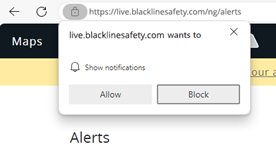
- Select the bell icon, located on the right side of the address bar. If notifications
are disabled, a prompt will open, notifying you that notifications are blocked.

- Select Allow to enabled browser notifications for Blackline Live.
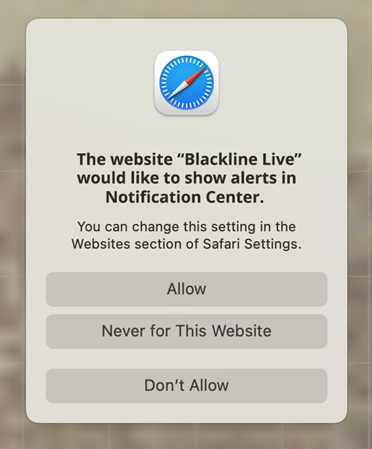
To enable Blackline Live browser notifications using a Safari browser
- Select Allow to enabled browser notifications for Blackline Live.
If you dismiss the pop-up or select Block, you can change the settings by selecting the settings icon to the left of the address bar.
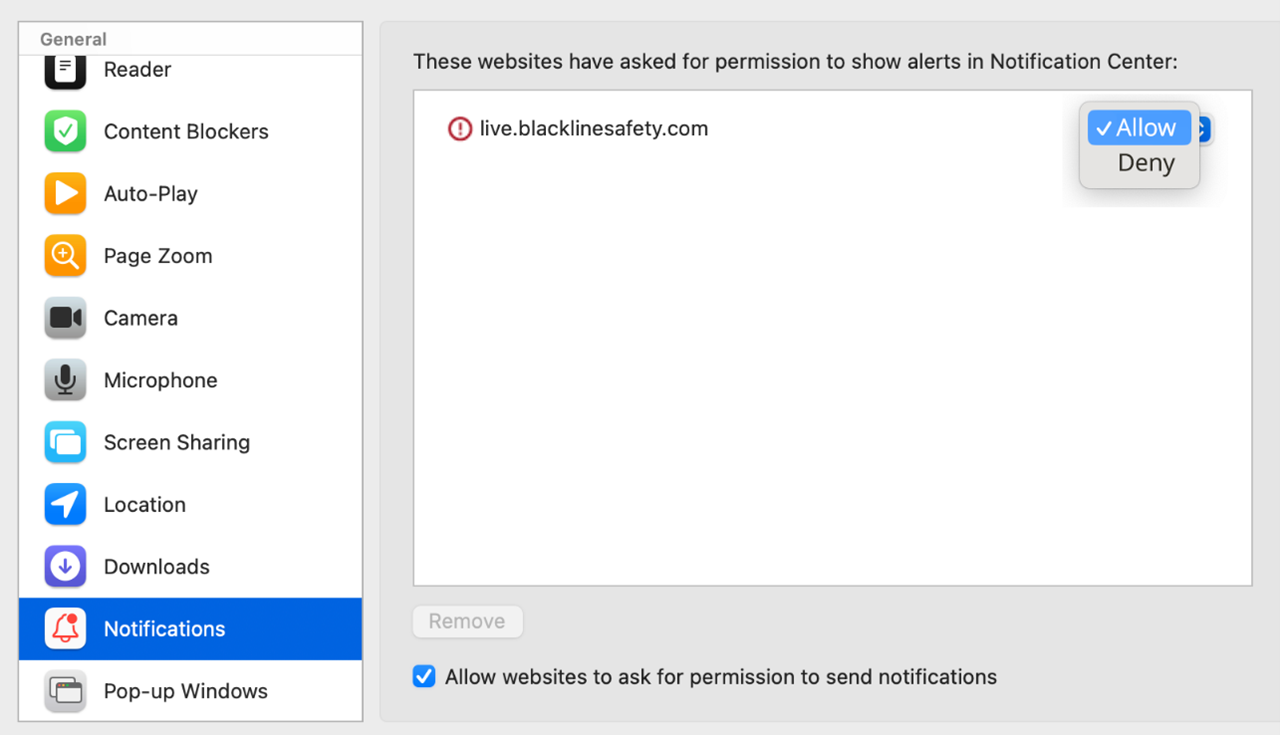
To enable Blackline Live browser notifications if you previously did not allow them
- Select Websites. The Websites page opens.

- Locate live.blacklinesafety.com on the right side, then select Allow from the drop-down to the right.
Checking if Blackline Live Browser Notifications are Enabled
If you’re not sure whether you have browser notifications enabled for Blackline Live, you can check through the Alerts page.
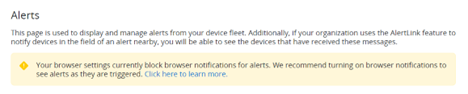
If browser notifications are set to Default (neither allowed nor denied), or Denied, there will be a yellow banner indicating that your current settings may not allow for browser notifications, along with a link to turn on notifications.
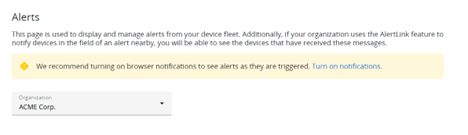
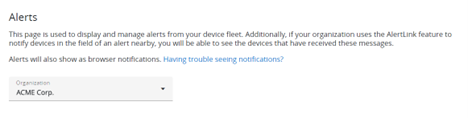
If browser notifications are enabled for Blackline Live, you will not see the yellow banner and there will be text in the page description indicating that notifications have been enabled. If your notifications are enabled, but you are not seeing them, see the Troubleshooting section of this article.
Receiving Alert Notifications in your Browser
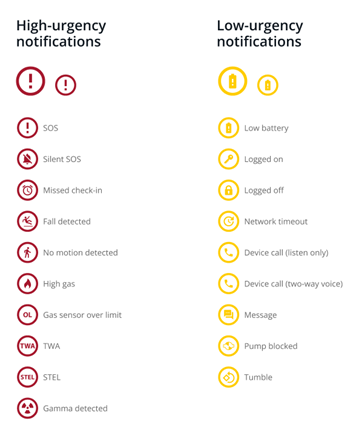
Alert notifications will look and behave differently depending on which browser and operating system you use. For all browsers, the notification will indicate the number of unacknowledged alerts and the type of the most recent alert. The icon displayed in the notification will reflect the type of the most recent alert.
Alert Icons
Browser Notification Examples
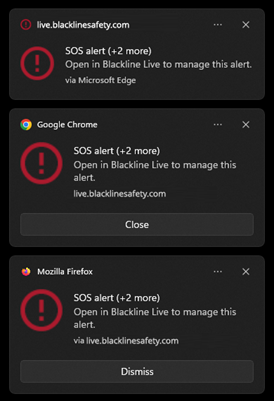
Below are a few examples of the same notification on different browsers. Selecting the browser notification will redirect you to Blackline Live’s Alerts page in a new tab. This will also dismiss the notification from your browser.
Troubleshooting
If the indicator on Blackline Live says that browser notifications have been enabled but you are not seeing notifications when alerts come into the portal, check the following:
You are not using an Incognito browser.
You are not using a Focus or Do not disturb mode on your device.
You have followed the directions in the Enabling Browser Notifications section above and the browser’s settings are set to Allow notifications.
Your browser version is up to date.
Technical Support
Contact details for the Blackline Safety Technical Support team.
Need help? Our Technical Support team is available 24/7 to assist you.
North America
Toll Free: 1-877-869-7212 | mailto:support@blacklinesafety.com
United Kingdom
+44 1787222684 | mailto:eusupport@blacklinesafety.com
International
+1-403-451-0327 | mailto:support@blacklinesafety.com