
Pedido de pruebas de funcionamiento y calibración de sensores de gas
Actualizado el 1 de noviembre de 2024.
This article describes the order in which you should bump test or calibrate your G7, G8, and EXO gas sensors. This article can be referenced when manually bump testing or calibrating your G7, G8, or EXO, and when bump testing or calibrating your G7 or G8 using G7/G8 Dock.
No utilices botellas de gas caducadas para las pruebas de funcionamiento y la calibración. El gas caducado puede afectar a la precisión de las pruebas de funcionamiento y la calibración.
Determinación de las pruebas de respuesta y la calibración de los sensores de gas Pedido
When bump testing and calibrating G7, G8, and EXO, to avoid sensor cross-sensitivity, you must consider the order in which you test your gas sensors. The gas order you select depends on the gas sensors your device is equipped with, and whether you are using single gas or combination gas cylinders.
Blackline Safety recommends that you use the following flow charts to determine the order in which you are going to bump test or calibrate your gas sensors.
The recommended order is the same whether you manually bump test and calibrate your G7 or G8 device or use G7/G8 Dock.
G7/G8 Dock will bump test and calibrate your device in the same order as the gas inlets, starting at inlet 1 and finishing at inlet 4. If your G7/G8 Dock is configured such that your bump test or calibration sequence is different than the flow charts below, your G7/G8 Dock gas inlets should be reconfigured to match the sequence outlined in the gas order flow charts.
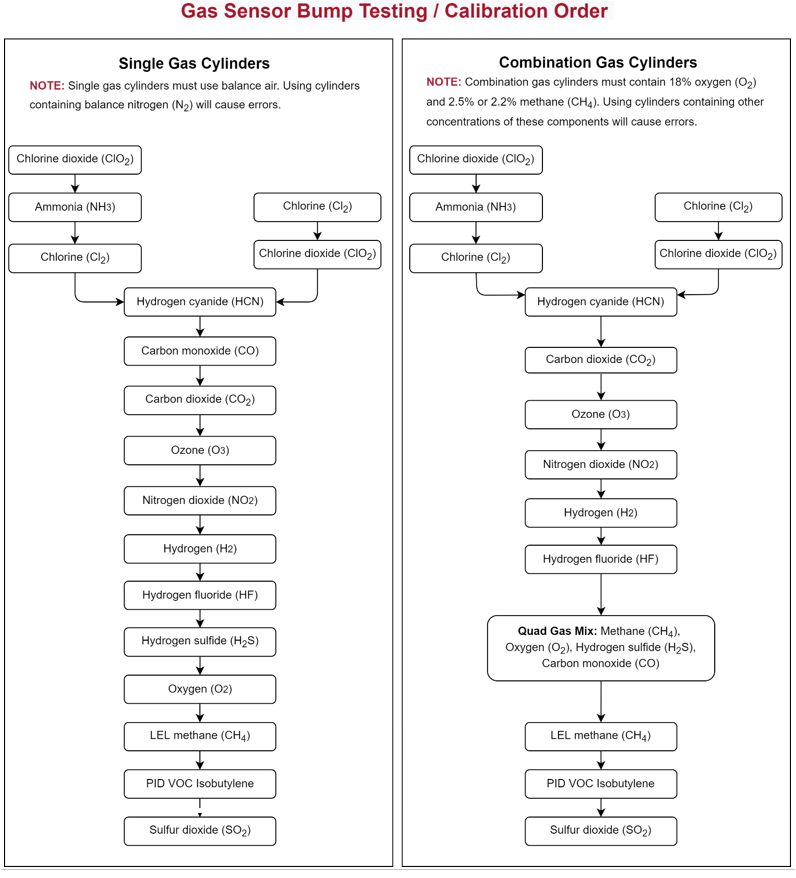
Prueba de funcionamiento o calibración mediante el pedido de gas Diagramas de flujo
Always follow the prompts on your G7 or G8 to ensure that the procedure test times and flow rates are appropriate to the gas you are testing.
Always follow Blackline’s recommendations for configuring your G7/G8 Dock gas inlets. For example, in the case where Cl2 and NH3 sensors are on the same cartridge, connect the Cl2 gas cylinder to inlet 1, and connect NH3 to inlet 2. For more information, refer to the G7 Dock Technical User Manual.
Asistencia técnica
Datos de contacto del equipo de asistencia técnica de Blackline Safety.
¿Necesitas ayuda? Nuestro equipo de asistencia técnica está a tu disposición las 24 horas del día, los 7 días de la semana, para ayudarte.
América del Norte
Número gratuito: 1-877-869-7212 | mailto:support@blacklinesafety.com
Reino Unido
+44 1787222684 | mailto:eusupport@blacklinesafety.com
Internacional
+1-403-451-0327 | mailto:support@blacklinesafety.com