
Viewing Pump Information
The procedure to view details about the G8 pump cartridge, including pump status, tubing length, flow rate, and sample time (if enabled).
When G8 is running in Pump Run mode, display the Modes screen.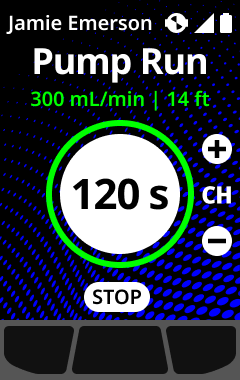
Depending on the configuration, the Modes screen can show the pump status, tubing length, flow rate, and sample time (if enabled).
Note:
Flow rate is the speed that air is passing over your device's sensors. To provide accurate gas readings, flow rate must be above 150 ml/min. A flow rate less than 150 ml/min results in a pump block notification.
By default, Blackline's pump aims to maintain a flow rate of 300 ml/min and G8 automatically adjusts its pump speed to maintain this rate.